
How to Move an Office Without Losing Business Days
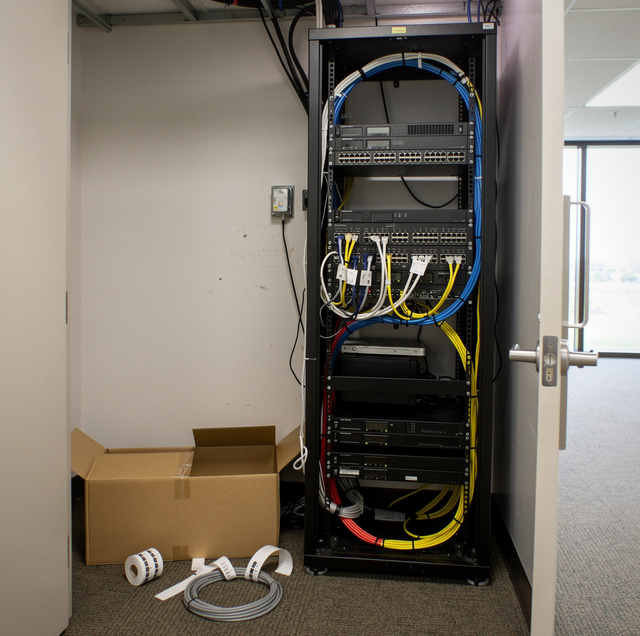
Monday morning, the desks are back in place, the chairs are unstacked, and nobody can log into anything. That's the moment an office move either pays off or turns into an expensive Monday, and it has almost nothing to do with how fast the movers carried furniture over the weekend. Most of the downtime a business ends up feeling was decided weeks earlier, in how the move was timed and in what order the network came down and went back up.
Why Office Moves Create Downtime That Home Moves Don't
A household move mostly involves furniture and boxes. An office move involves a working network: servers or a network closet, phone and internet lines that need to be re-provisioned at the new address, multiple workstations that all need to come back online in a specific order, and often a security or access system tied to the building itself. None of that downtime comes from slow lifting. It comes from the gap between disconnecting a system at the old address and having it fully live again at the new one, and that gap is almost entirely a scheduling problem.
The Three Timing Approaches, Compared
Most office moves fall into one of three timing patterns. Each trades speed for disruption differently, and the right pick depends more on whether the business can tolerate a full day offline than on the size of the office.
| Approach | How It Works | Downtime Impact | Best Fit |
|---|---|---|---|
| Weekend Move | Entire move happens Friday evening through Sunday, office reopens Monday | Zero business-hours downtime, but requires the whole move compressed into roughly 48 hours | Offices that can prep and pack fully before Friday |
| After-Hours Move | Move happens over several weeknights after close, a portion of the office each night | Minimal downtime, spread across a week instead of one weekend | Larger offices that can't be fully packed by one Friday |
| Phased Department Move | One department relocates at a time while others keep working at the old address | Some departments run at reduced capacity temporarily, but the business never fully closes | Businesses that can't close entirely, even for a weekend |
A weekend move gets the whole office back online at once with no partial-capacity period, but it requires that packing, sign-off, and prep work all be completed by Friday afternoon, which is a tight window if departments aren't ready in time. A phased move spreads the disruption out but requires running two locations at once for a stretch, which adds its own coordination overhead, such as forwarding calls between two addresses.
The IT Sequencing That Actually Determines Downtime
The single biggest lever for cutting downtime isn't the movers' speed; it's the order the network comes down and goes back up. A network closet or server rack should be among the very last things disconnected at the old address and the very first things reconnected at the new one, since every workstation depends on it. Moving the server rack in the middle of the day's loading, sandwiched between furniture, means nobody can log in even after their desk is set up.
Label every cable before it's pulled: Color-coded tags or a simple numbered system on both ends of a cable, matched to a diagram of the network closet, turns reconnection into matching numbers instead of guessing which cord fed which switch port.
Move the network closet as a standalone unit, not mixed in with furniture: Keeping server equipment together in its own load, protected and loaded last, means it can be unloaded first at the new site and given time to boot and re-sync before anyone needs it.
Test connectivity before staff arrive: A short window, even just a few hours, between the network coming back online and the rest of the staff showing up catches a bad connection or a mislabeled cable before it becomes forty people unable to log in at once.
Furniture and Desk Setup Without Slowing the Network Team Down
Workstations, desks, and shared furniture can move on a completely separate timeline from the network equipment, and keeping those two tracks apart is what lets an office move fast without one team waiting on the other. Desks that need disassembly, like modular workstations with attached partitions, should get broken down and tagged with a matching desk number so reassembly at the new site doesn't turn into a puzzle of mismatched panels. Shared equipment like printers and copiers should move toward the end of the furniture load, since they're usually the last thing anyone needs on day one and the first thing that can wait a few extra hours if the schedule runs long.
What to Confirm With the New Building Before Moving Day
Commercial buildings often have their own move-in requirements that residential movers rarely deal with: a certificate of insurance the building management requires before movers can even access a freight car, a reserved loading dock window, and sometimes restricted hours for large deliveries. Confirming these details a week ahead, not the day before, avoids the scenario where a fully loaded truck arrives and has to wait in a parking lot because nobody reserved a spot at the dock for that afternoon.
Frequently Asked Questions
Most of the downtime risk gets resolved in the two to three weeks before the move, since that's when internet and phone re-provisioning at the new address needs to be requested, and that process often has its own multi-day lead time separate from anything the movers control.
Some can, if their role doesn't depend on the office network. A laptop, a phone, and a home or coffee shop Wi-Fi connection are enough for many people to stay productive through moving day, even during a full weekend move. What doesn't work is anyone counting on the shared server, the office VoIP phone system, or the building Wi-Fi during the transition window, since those are deliberately offline while they're being disconnected, moved, and reconnected.
Most offices forward their main line to a temporary number or a staff member's cell phone during the transition window, so incoming calls aren't simply dropped while the phone system itself is disconnected and being reinstalled at the new address.
It depends more on how the office is set up than on headcount. A small office running mostly cloud-based tools, where staff log into email and software through a browser instead of a local server, often has little to sequence beyond getting internet service live at the new address. An office with even a small on-site server tucked in a closet still needs that piece treated as the priority item, regardless of how few desks surround it.
Furniture or equipment that wasn't cleared for move day, like a desk still full of files that needs boxing on the spot, which turns a scheduled hour of loading into two or three hours the crew didn't budget for.
Yes. Filing cabinets containing confidential records should stay locked and be moved as a sealed unit rather than emptied into open boxes, and it's worth confirming who has the keys and who's responsible for the cabinet at both ends of the move.
Settle the timing approach first, sequence the network around it, and confirm the new building's access requirements a week out. Those three decisions are what separate an office that's back to full productivity by Monday morning from one still troubleshooting logins on Wednesday afternoon.
Plan your office move around your schedule, not the other way around — get a move that keeps your team working. Timeless Moving LLC serves Katy, Cypress, and Sugar Land. Call (346) 489-5383.
